
Using Saved Comments in Observations
Using Saved Comments in Observations
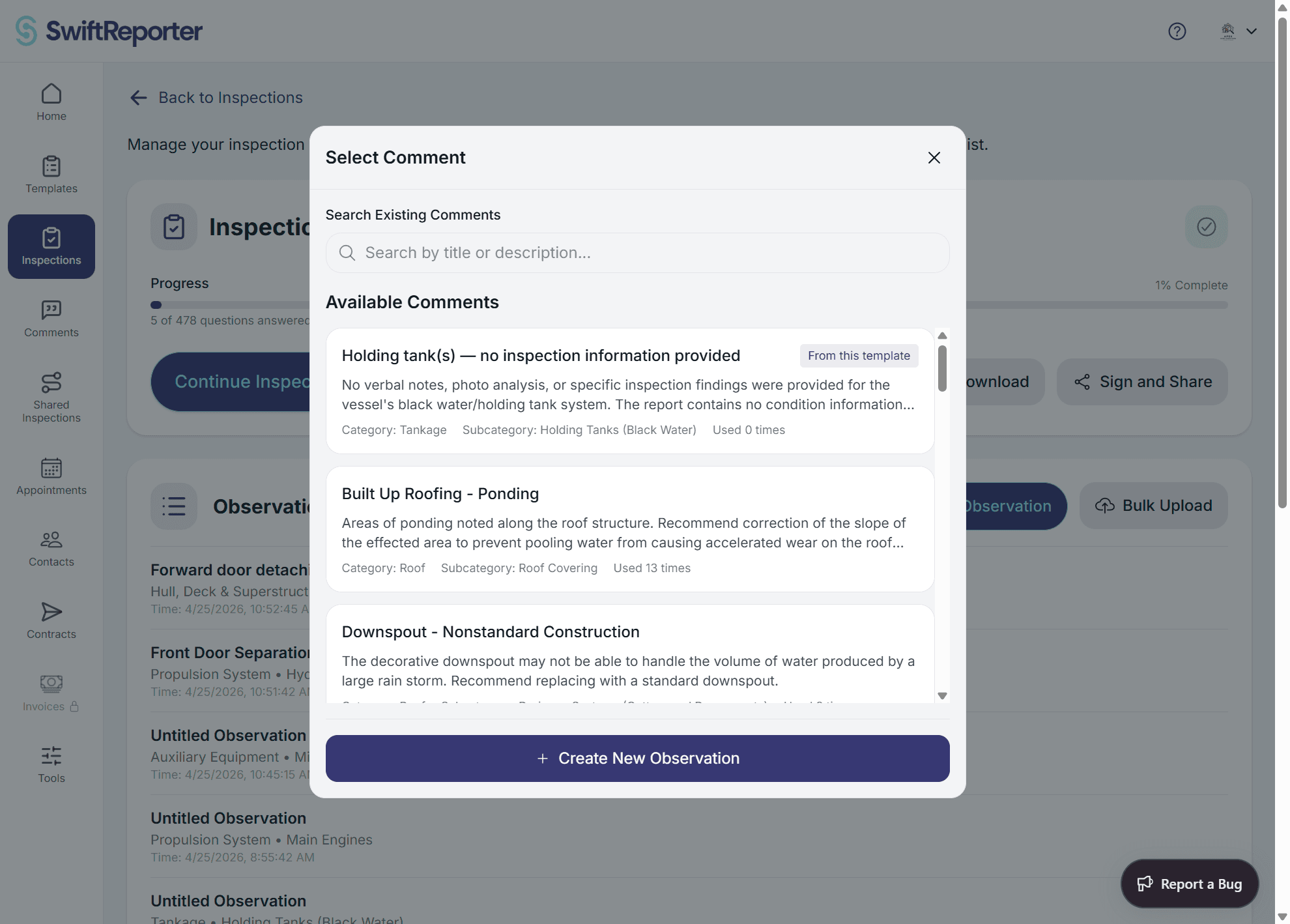
Your comment library is a powerful tool that allows you to apply pre-written, professional observations quickly during inspections. This feature saves time while maintaining consistency and quality across all your inspection reports.
Understanding Your Comment Library
Comment Library Organization
Template-Based Structure: Your comment library is organized to align with your inspection workflow:
- Template Association: Comments are filtered by selected template
- Category Organization: Comments grouped by inspection categories
- Subcategory Refinement: Further organized by specific component areas
- Type Classification: Separated into defect comments and note comments
Comment Types Available:
- Defect Comments: Issues requiring action, include recommendations and severity
- Note Comments: Informational content providing context and background
- Template-Specific: Comments created for specific inspection types
- Personal Library: Your custom-built collection of reusable observations
Accessing Your Comment Library
During Observation Creation:
- Navigate to Observation: Open a new or existing observation
- Find Search Function: Look for the magnifying glass icon or "Search Comments" button
- Open Comment Library: Tap to access your searchable comment collection
- Browse or Search: Use filters and search to find relevant comments
Searching for Comments
AI-Powered Search
Intelligent Search Features: The comment search uses advanced AI to help you find relevant content:
Search Capabilities:
- Semantic Understanding: Searches by meaning, not just keywords
- Context Awareness: Considers your current template, category, and subcategory
- Natural Language: Use descriptive phrases like "electrical outlet not working"
- Professional Translation: Understands casual language and finds professional equivalents
Search Methods:
- Descriptive Search: Type what you observed: "water damage on ceiling"
- Problem-Based Search: Describe the issue: "outlet won't reset"
- Component Search: Search by item: "GFCI outlet"
- Action-Based Search: Search by needed action: "replacement required"
Advanced Search Features
Search Refinement:
- Template Filtering: Automatically filtered to current template
- Category Filtering: Narrow to specific inspection categories
- Type Filtering: Choose between defect and note comments
- Usage Filtering: Find frequently used or recently applied comments
Search Tips:
- Use Natural Language: "leaky faucet" instead of just "faucet"
- Include Context: "basement electrical panel" vs. just "panel"
- Describe Problems: "crack in foundation wall" vs. just "crack"
- Include Location: "kitchen GFCI outlet" for more specific results
Applying Comments to Observations
Comment Application Process
Selecting and Applying Comments:
- Review Search Results: Browse through relevant comment suggestions
- Preview Content: Read comment title, description, and recommendations
- Choose Application Method: Apply directly or apply with modifications
- Confirm Selection: Accept the comment for your observation
Application Options:
- Apply As-Is: Use the comment exactly as written in your library
- Apply with Modifications: Use comment as base and customize for specific situation
- Preview Full Details: View complete comment before applying
- Compare Similar: Review multiple similar comments before choosing
Customizing Applied Comments
Modification During Application: When applying a comment, you can customize it for the specific situation:
Customization Options:
- Location Specificity: Add precise location details ("master bathroom" vs. "bathroom")
- Severity Adjustment: Modify severity based on actual conditions observed
- Additional Context: Include site-specific details or circumstances
- Recommendation Refinement: Adjust recommendations for specific situation
Example Customizations:
- Base Comment: "GFCI outlet not working"
- Customized: "GFCI outlet in master bathroom near vanity not working - client reports outlet stopped functioning last week"
- Location Added: Kitchen counter outlet near sink
- Context Added: "Outlet appears to have moisture exposure"
Managing Applied Comments
After Application: Once you've applied a comment to an observation:
Review and Refine:
- Accuracy Check: Verify the applied comment accurately reflects your findings
- Detail Enhancement: Add inspection-specific details not in the original comment
- Professional Polish: Ensure language meets your professional standards
- Context Integration: Ensure comment fits well with other observation content
Quality Assurance:
- Content Validation: Confirm accuracy of applied content
- Recommendation Appropriateness: Ensure suggestions are feasible for this situation
- Severity Verification: Confirm severity level matches actual conditions
- Professional Standards: Maintain consistent quality across all observations
Creating Comments from Observations
Building Your Library During Inspections
Creating New Comments: When you create custom observations that work well, save them as comments:
Save Process:
- Create Quality Observation: Develop a well-written observation during inspection
- Identify Reusability: Recognize content that could apply to future inspections
- Save as Comment: Use the "Save as Comment" or similar function
- Categorize Properly: Assign to appropriate template, category, and subcategory
Comment Creation Strategy:
- Professional Language: Use formal, professional terminology
- Complete Information: Include title, description, and recommendations
- Appropriate Categorization: Place in logical template categories
- Reusability Focus: Create content that applies to multiple situations
Enhancing Existing Comments
Comment Improvement Process: Use inspection experience to improve existing comments:
Enhancement Methods:
- Detail Addition: Add specific details learned from recent inspections
- Language Refinement: Improve clarity and professionalism
- Recommendation Updates: Enhance suggestions based on field experience
- Context Expansion: Add relevant background information
When to Update Comments:
- Improved Understanding: When you gain new knowledge about an issue
- Better Language: When you develop better ways to explain problems
- Enhanced Recommendations: When you learn more effective solutions
- Professional Development: As your expertise and communication skills improve
Comment Library Management
Organizing Your Library
Strategic Organization:
- Template Alignment: Ensure comments align with your template structure
- Logical Categorization: Place comments in intuitive categories
- Consistent Naming: Use clear, descriptive titles for easy searching
- Regular Maintenance: Periodically review and update comment content
Quality Control:
- Regular Review: Assess comment accuracy and relevance
- Content Updates: Keep information current with codes and standards
- Usage Analysis: Track which comments work best in practice
- Professional Standards: Ensure all comments meet quality standards
Best Practices for Comment Usage
Efficiency Strategies:
- Pre-Inspection Review: Familiarize yourself with relevant comments before inspections
- Search Skill Development: Practice effective search techniques
- Customization Preparation: Develop skills for quick comment customization
- Quality Habits: Maintain high standards for all applied comments
Professional Development:
- Continuous Improvement: Regularly refine your comment library
- Industry Updates: Keep comments current with industry standards
- Skill Enhancement: Develop expertise in comment application and customization
- Knowledge Sharing: Learn from other professionals' comment strategies
Advanced Comment Features
AI-Enhanced Comment Suggestions
Intelligent Recommendations: The system can suggest comments based on:
- Audio Content: Comments matching your voice recordings
- Photo Analysis: Visual content analysis for relevant suggestions
- Context Patterns: Historical usage patterns in similar situations
- Template Logic: Comments appropriate for current template section
Comment Analytics
Usage Insights: Track how your comment library performs:
- Most Used Comments: Identify your most valuable content
- Search Patterns: Understand how you typically find comments
- Application Success: Monitor which comments work best in practice
- Library Growth: Track expansion and improvement of your library
Integration with Other Features
Workflow Integration: Comments work seamlessly with other system features:
- Audio Recording: Voice recordings can suggest relevant comments
- Photo Documentation: Visual content supports comment application
- Report Generation: Applied comments integrate professionally into reports
- Template Compliance: Comments ensure template requirements are met
Troubleshooting Comment Usage
Common Issues
Search Problems:
- No Results Found: Try broader, more descriptive search terms
- Irrelevant Results: Refine search with more specific language
- Missing Comments: Verify comments are properly categorized
- Search Performance: Check internet connectivity for AI-powered search
Application Issues:
- Inappropriate Content: Review comment carefully before applying
- Customization Difficulties: Practice modifying comments for specific situations
- Quality Concerns: Ensure applied comments maintain professional standards
- Context Mismatches: Verify comments fit the specific inspection situation
Performance Optimization
Search Efficiency:
- Descriptive Terms: Use clear, specific language in searches
- Context Inclusion: Include relevant context in search terms
- Category Awareness: Understand how comments are organized
- Practice Regular Use: Develop familiarity with your comment library
Application Quality:
- Review Before Applying: Always verify comment appropriateness
- Customize Thoughtfully: Make meaningful modifications for specific situations
- Maintain Standards: Ensure all applied content meets professional requirements
- Learn from Experience: Improve comment usage based on results
Benefits of Effective Comment Usage
Efficiency Gains
Time Savings:
- Rapid Application: Apply professional content instantly
- Reduced Typing: Minimize manual observation creation
- Consistent Quality: Maintain professional standards efficiently
- Streamlined Workflow: Integrate seamlessly with inspection process
Quality Improvements
Professional Standards:
- Consistent Language: Maintain uniform professional terminology
- Complete Observations: Ensure comprehensive coverage of issues
- Accurate Recommendations: Provide appropriate suggestions for action
- Industry Compliance: Meet professional inspection standards
Long-Term Benefits
Professional Development:
- Knowledge Building: Expand expertise through comment library development
- Quality Improvement: Continuously enhance professional output
- Efficiency Evolution: Develop increasingly effective workflows
- Industry Leadership: Demonstrate professional excellence through quality documentation
Effective use of your comment library transforms the inspection process from time-consuming manual documentation to efficient, professional observation creation while maintaining the highest quality standards.