
AI-Powered Search and Organization
AI-Powered Search and Organization
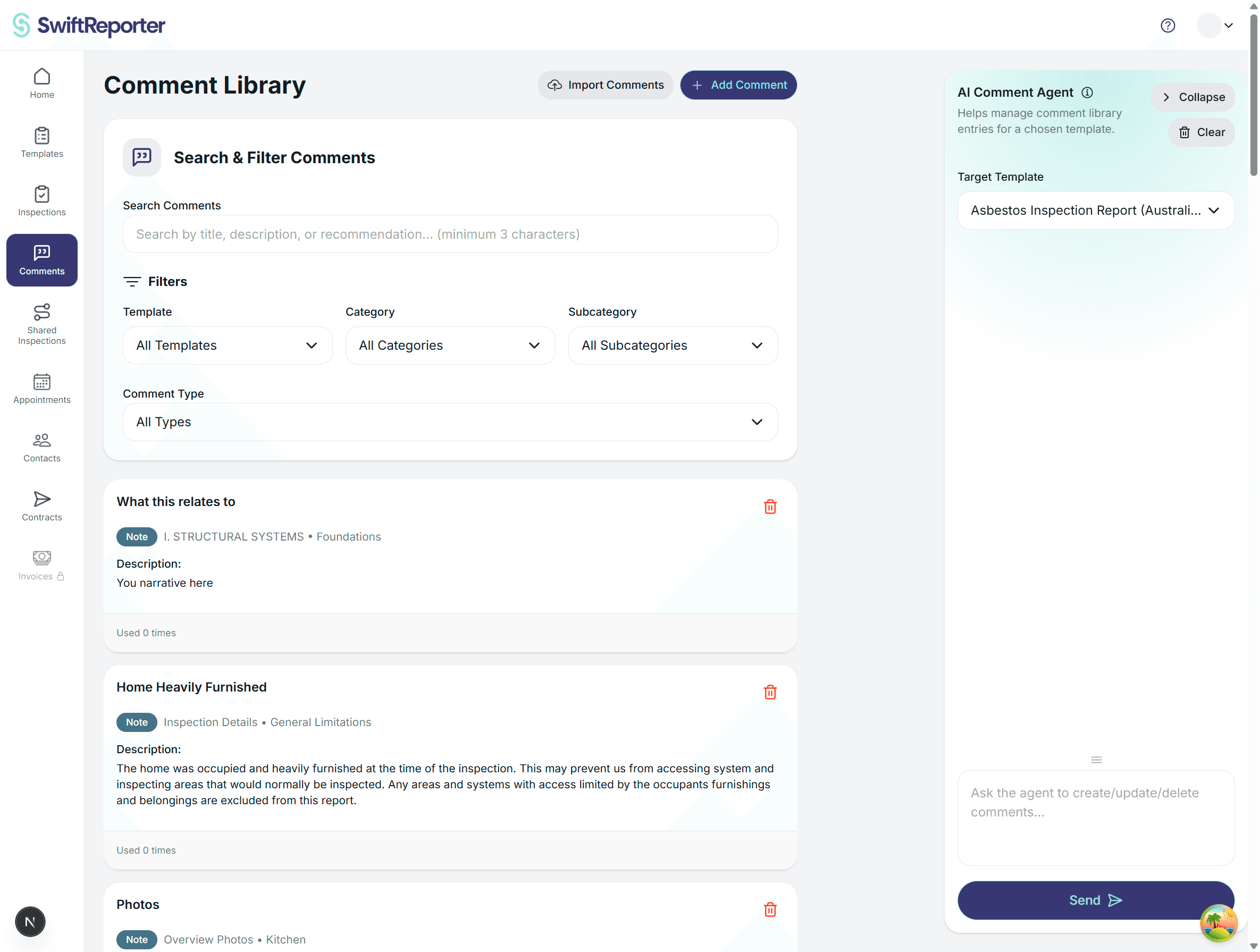
The comments library uses two complementary ways to find saved comments: keyword partial search for typed fragments, and similarity search (background indexing) for meaning-based near-matches. Filters for template, category, subcategory, and comment type narrow results on both web and mobile.
How comment search works
Keyword partial search
Use this when you know part of the wording or section name.
- SwiftReporter splits your query on spaces. Every term must appear somewhere in the comment's title, description, recommendation, category, or subcategory. Terms do not need to be adjacent or in order.
- Example:
ext rail lowcan match a deck-railing comment under Exterior even though the words are spread across the title and category names. - When search text is active, SwiftReporter loads your full accessible library (personal plus organization-shared comments you can access), applies matching, then paginates results. Matches are not hidden behind a browse-only page limit.
- Web Comments page: Enter at least 3 characters before search runs. Shorter input shows Enter at least 3 characters to search under the search field.
- Mobile comment list and in-inspection comment pickers: No minimum character count — search runs as soon as you type.
Similarity search (embeddings)
Use this for longer, meaning-based lookups when your words differ from the saved comment text.
- When you save or edit a comment's title, description, or recommendation, SwiftReporter indexes the text in the background for similarity ranking.
- Newly saved or edited comments can take a few seconds to appear in similarity-based results. Keyword search reflects saved text once the library has loaded.
- Similarity search complements keyword search; short abbreviated fragments are intended to work through keyword matching.
Understanding AI-Powered Search
Semantic similarity
Similarity search uses background indexing to rank comments by meaning:
How It Works:
- Background indexing: When you save or edit a comment, title, description, and recommendation text are indexed for similarity search
- Semantic matching: Finds comments with similar meanings even when the exact words differ
- Complements keyword search: Partial keyword matching handles short typed fragments; similarity search helps with longer, meaning-based queries
- Template context: In-field comment pickers rank comments from the current template ahead of others
Benefits:
- Find relevant comments when you describe the issue in your own words
- Surface near-matches that keyword fragments might miss on longer queries
- Keep interactive search responsive because heavy indexing runs on save, not on every keystroke
Vector Embeddings Explained
What Are Vector Embeddings? Vector embeddings are numerical representations that capture the semantic meaning of text. When you create a comment, the system automatically generates embeddings that represent the meaning of your content.
Automatic Generation:
- Created automatically when you save comments
- Updated when you edit existing comments
- Background processing doesn't slow down your workflow
- Continuously improved through usage patterns
Search Advantages:
- Find comments based on meaning, not just keywords
- Discover relationships between different comments
- Get intelligent suggestions based on context
- Improve search accuracy over time
Advanced Search Techniques
Natural Language Searching
Instead of thinking in keywords, you can search using natural language:
Traditional Keyword Search:
- "GFCI outlet broken"
- "water heater leak"
- "electrical panel"
Natural Language Search:
- "outlet in bathroom not working"
- "water coming from water heater"
- "electrical issues in main panel"
Example Comparisons:
| Search Query | Keyword Results | AI Results |
|---|---|---|
| "outlet not working" | Comments with "outlet" and "not working" | GFCI failures, electrical receptacle issues, power problems |
| "water damage" | Comments with "water" and "damage" | Moisture intrusion, leak damage, water stains, humidity issues |
| "safety concern" | Comments with "safety" and "concern" | Hazardous conditions, code violations, injury risks |
Contextual Intelligence
The AI considers multiple factors when ranking search results:
Current Context:
- Template: Prioritizes comments from your current template
- Category: Emphasizes comments from similar categories
- Subcategory: Highlights subcategory-specific comments
- Recent Usage: Surfaces recently used comments for similar situations
Usage Patterns:
- Frequency: Comments you use often appear higher in results
- Recency: Recently used comments get priority
- Success Rate: Comments that lead to completed observations rank higher
- Seasonal Patterns: Comments used during similar seasons or conditions
Search Optimization Strategies
Use Descriptive Terms:
- Instead of "problem," use "defect," "issue," or "concern"
- Instead of "thing," use specific component names
- Include severity indicators like "safety," "urgent," or "maintenance"
Combine Concepts:
- "electrical safety hazard" instead of just "electrical"
- "water heater maintenance" instead of just "water heater"
- "structural integrity concern" instead of just "structural"
Leverage Context:
- Search while in the relevant category for better results
- Use subcategory context to refine results
- Consider template-specific terminology
Intelligent Organization Features
Automatic Categorization
The AI helps organize your comments more effectively:
Category Suggestions:
- Analyzes comment content to suggest appropriate categories
- Identifies misplaced comments and suggests corrections
- Recommends category improvements based on usage patterns
- Helps maintain consistent categorization across your library
Subcategory Optimization:
- Suggests more specific subcategories when appropriate
- Identifies opportunities for better organization
- Recommends subcategory creation for frequently used content
- Helps balance subcategory distribution
Duplicate Detection
The system identifies potential duplicates and near-duplicates:
How It Works:
- Compares semantic similarity between comments
- Identifies comments with similar meaning but different wording
- Flags potential duplicates for review
- Suggests consolidation opportunities
Benefits:
- Reduces library clutter
- Improves search efficiency
- Maintains content quality
- Simplifies library management
Example Duplicate Detection:
- "GFCI outlet not functioning" and "GFCI receptacle failure"
- "Water heater leaking" and "Water heater showing signs of leakage"
- "Electrical panel overcrowded" and "Main panel has too many circuits"
Content Enhancement Suggestions
The AI provides suggestions to improve your comment content:
Writing Quality:
- Suggests clearer language
- Recommends technical accuracy improvements
- Identifies missing information
- Proposes better structure
Searchability:
- Recommends keyword additions
- Suggests synonym inclusion
- Proposes tag improvements
- Identifies search optimization opportunities
Consistency:
- Flags inconsistent terminology
- Suggests standardized language
- Recommends format improvements
- Identifies style inconsistencies
Usage Analytics and Insights
Comment Performance Metrics
The system tracks detailed analytics about your comment usage:
Usage Frequency:
- How often each comment is used
- Trending comments over time
- Most valuable comments in your library
- Seasonal usage patterns
Search Performance:
- Which comments are found most easily
- Search terms that lead to successful applications
- Comments that are hard to find
- Search optimization opportunities
Application Success:
- Comments that lead to completed observations
- Comments that require frequent customization
- Comments that are abandoned after application
- Quality indicators for comment content
Optimization Recommendations
Based on your usage patterns, the system provides recommendations:
Library Structure:
- Suggests category reorganization
- Recommends subcategory optimization
- Identifies organization inefficiencies
- Proposes structure improvements
Content Improvements:
- Highlights underperforming comments
- Suggests content updates
- Recommends deletion of unused comments
- Proposes new comment creation
Search Optimization:
- Identifies search pattern trends
- Suggests keyword additions
- Recommends tagging improvements
- Proposes library organization changes
Personal AI Learning
The system learns from your individual usage patterns:
Behavioral Learning:
- Remembers your search preferences
- Learns your categorization style
- Adapts to your inspection patterns
- Personalizes search results
Contextual Adaptation:
- Understands your template preferences
- Learns your category priorities
- Adapts to your inspection workflow
- Personalizes recommendations
Advanced Filter Combinations
Multi-Dimensional Filtering
Combine multiple filters for precise results:
Template + Category + Usage:
- Find frequently used electrical comments for residential inspections
- Identify rarely used plumbing comments for commercial inspections
- Locate seasonal comments for specific property types
Time-Based Filtering:
- Recent comments for current season
- Comments used in last 30 days
- Comments created this year
- Historical usage patterns
Performance-Based Filtering:
- High-success comments that lead to completed observations
- Comments requiring frequent customization
- Comments with high search ranking
- Comments with consistent application
Smart Filter Suggestions
The AI suggests filter combinations based on:
- Current search query
- Your usage patterns
- Template context
- Category focus
Example Smart Suggestions:
- When searching "electrical," suggests filtering by "Residential" template
- When in "Plumbing" category, suggests filtering by "Defect" type
- When searching "safety," suggests filtering by "High Priority" usage
- When in inspection mode, suggests filtering by "Recent" usage
Continuous Improvement
AI Model Updates
The system continuously improves through:
Global Learning:
- Learns from anonymized usage patterns across all users
- Improves search accuracy through collective intelligence
- Updates semantic understanding based on industry trends
- Enhances categorization suggestions
Personal Optimization:
- Adapts to your individual preferences
- Learns from your successful searches
- Improves recommendations based on your workflow
- Personalizes search result ranking
Feedback Integration
Your usage provides feedback that improves the system:
Implicit Feedback:
- Successful comment applications
- Search result selections
- Time spent reviewing comments
- Customization patterns
Explicit Feedback:
- Rating search results
- Reporting inappropriate suggestions
- Providing categorization feedback
- Suggesting system improvements
Best Practices for AI Optimization
Search Strategy
Use Natural Language:
- Search as you would describe the issue to a colleague
- Use complete phrases rather than single words
- Include context and severity indicators
- Be specific about the type of issue
Leverage Context:
- Search while in the relevant category
- Use template-specific terminology
- Consider subcategory context
- Include location or component details
Experiment with Variations:
- Try different phrasings for the same concept
- Use synonyms and related terms
- Combine different aspects of the issue
- Test various search approaches
Library Optimization
Regular Maintenance:
- Review AI suggestions monthly
- Update comments based on recommendations
- Remove duplicates identified by the system
- Consolidate similar comments
Content Quality:
- Write descriptive titles and content
- Include relevant keywords naturally
- Use consistent terminology
- Provide complete information
Organization:
- Follow AI categorization suggestions
- Maintain consistent subcategory structure
- Use recommended tagging
- Update organization based on usage patterns
Feedback Participation
Provide Feedback:
- Rate search results when prompted
- Report inappropriate suggestions
- Confirm or correct categorization recommendations
- Suggest improvements through feedback channels
Usage Patterns:
- Use the system consistently for best learning
- Apply comments that match your searches
- Complete observations after applying comments
- Maintain regular inspection workflow
Troubleshooting AI Features
Search Issues
AI Search Not Finding Relevant Comments:
- Try alternative phrasings
- Use more specific terminology
- Check category and template context
- Verify comment exists in library
Too Many Irrelevant Results:
- Use more specific search terms
- Apply appropriate filters
- Consider category context
- Provide feedback on results
Performance Issues
Slow Search Response:
- Check network connectivity
- Clear app cache
- Reduce search complexity
- Contact support if persistent
Embedding generation delays:
- New or recently edited comments can take a few seconds to appear in similarity-based results
- Keyword search reflects saved text once the library has loaded
- Verify network connection if results stay empty after saving
Accuracy Issues
Incorrect Categorization Suggestions:
- Provide feedback on suggestions
- Verify comment content quality
- Check for duplicate content
- Review categorization consistency
Poor Search Rankings:
- Improve comment content quality
- Use more descriptive titles
- Include relevant keywords
- Provide usage feedback
Future Enhancements
Planned Improvements
Enhanced Semantic Understanding:
- Improved industry-specific terminology
- Better context awareness
- More accurate similarity matching
- Enhanced natural language processing
Advanced Analytics:
- Predictive usage patterns
- Seasonal trend analysis
- Performance optimization suggestions
- Workflow efficiency recommendations
Integration Enhancements:
- Template-aware search optimization
- Cross-template comment suggestions
- Workflow-integrated recommendations
- Real-time optimization feedback
Feedback-Driven Development
The AI features continuously evolve based on user feedback:
- Search accuracy improvements
- Better categorization suggestions
- Enhanced duplicate detection
- Improved personalization
💡 Tip: The AI features become more powerful with consistent use. Regular interaction with the system helps it learn your preferences and provide better recommendations over time.
Summary
AI-powered search and organization features transform the comment system from a simple library into an intelligent inspection assistant. By understanding and leveraging these capabilities, you can:
- Find relevant comments faster and more accurately
- Maintain a well-organized, efficient comment library
- Discover relationships and opportunities for improvement
- Optimize your inspection workflow based on data-driven insights
The key to success is regular use, providing feedback, and following optimization recommendations. As you engage with the AI features, they become increasingly personalized and effective, ultimately making your inspection process more efficient and your reports more consistent and professional.