Latest Updates

1.8.0

Report Sections and Drag-Drop Media

April 27, 2026

Report Sections, Left TOC, and Richer Media

Version 1.8.0 makes long reports easier to navigate and longer templates easier to author. Report Sections group related categories for screen and print, a left-hand table of contents reshapes the web report editor, and inspectors get drag-and-drop reordering across photos and videos — plus a new Marine Pre-Purchase Condition & Value prebuilt.

Added

  • Report Sections — An optional grouping above categories that organises related categories under a shared title for both on-screen reporting and the printed PDF. Enabled from Template Settings and authored in the main template editor; web supports drag-and-drop to reorder sections and move categories between them, and mobile offers the same model with containers, an Add section action, and a per-category picker with move arrows. Section titles also appear in completion, preview, and the table of contents.
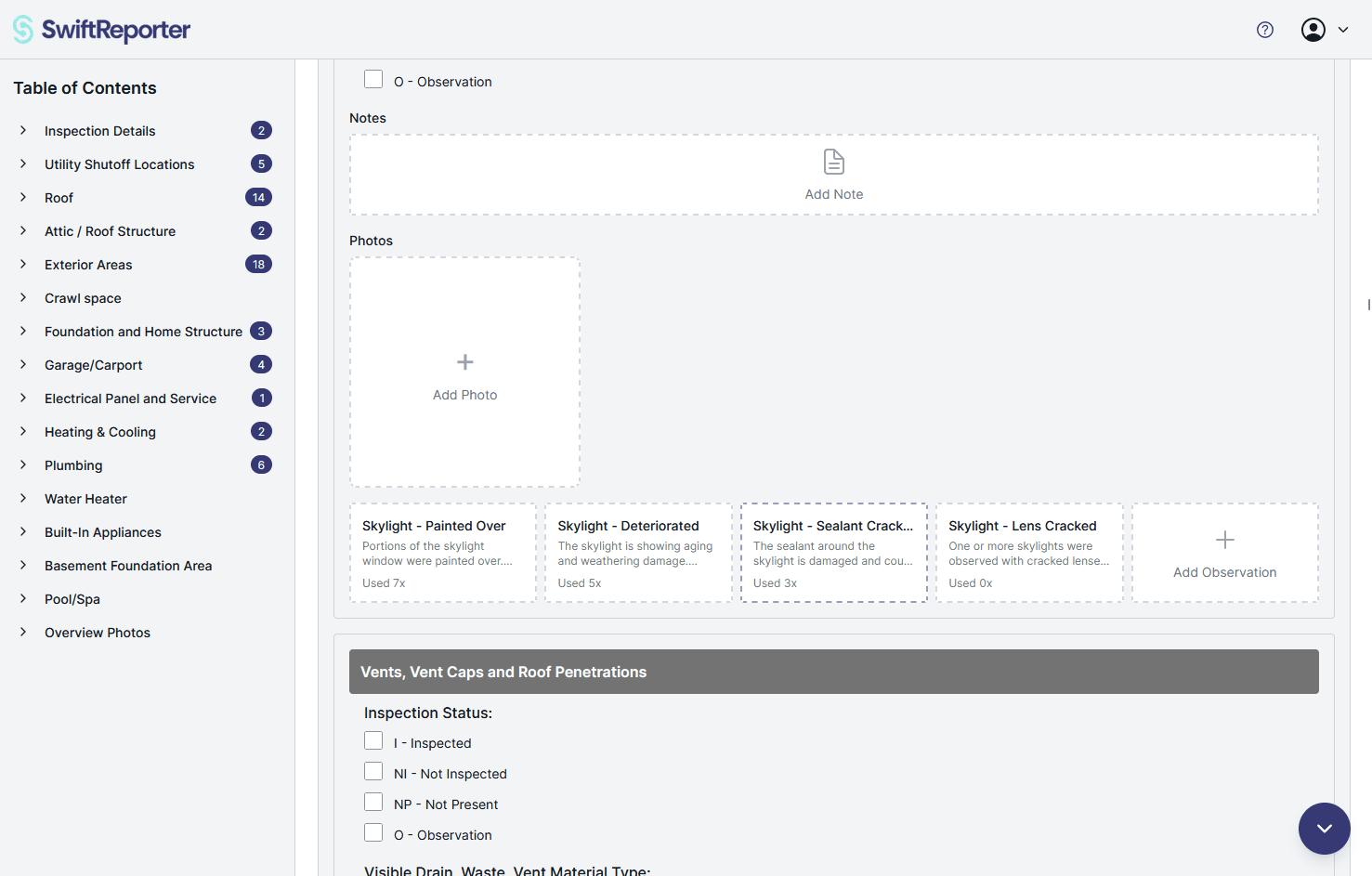
  • Left Table of Contents on web — Report completion now uses a left-hand table of contents modeled on Preview, with a dockable layout on desktop. In very large reports, jumping via the TOC scrolls straight to the target and expands only that category instead of cascading through everything in between.
  • Reorder Photos and Videos by Drag-and-Drop — Inspectors can rearrange photos and videos within a media grid and drag them between grids on web. Mixed photo and video order is preserved, the custom order is honored in the on-screen report and the generated PDF, and drag is disabled on read-only views and while uploads are still in progress.
  • Videos on Questions and Required Notes — Videos can now be attached to question- and required-note-level grids in addition to observations, subcategories, and cover pages, and flow through to the generated report and read-only viewer in the right place.
  • Web Camera Digital Zoom — The in-app web camera supports always-available digital zoom for photo capture, with a quality warning at higher zoom levels. Zoom controls are hidden during video recording.
  • Full-Screen Web Photo Camera — The web camera for photo capture now opens as a full-screen experience instead of nested inside a category card.
  • Required Notes — Add Note path — Template authors can allow an Add Note action on a required-note group so inspectors can search the library or create a new note inline and still satisfy the requirement.
  • Required Notes — Text type — A new required-note variant blocks subcategory progress until the inspector writes a free-text note, complementing the existing pick-from-list modes.
  • Note — Hide Title option — Library notes can now carry an optional Hide Title setting that suppresses the title in both the on-screen report and the generated PDF (default off).
  • Marine Pre-Purchase Condition & Value prebuilt — A new marine prebuilt built around Report Sections, with narrative-heavy areas modeled as required-notes groups that allow the Add Note path, and a companion notes spreadsheet organisations can bulk-import into their comments library for ready-to-use marine language.
  • CTIA-Compliant SMS Opt-In on the Customer Portal — The portal's SMS opt-in now shows the full compliant disclosure set (program name, message categories, frequency, message-and-data-rates language, STOP/HELP, consent-not-a-condition-of-purchase, and links to Privacy and Terms) with a default-unchecked opt-in checkbox.

Changed

  • Smarter Observation Summarize — Summarize now auto-saves the observation and its linked media before running, and exits immediately when there is nothing meaningful to summarise. The same action is now exposed on mobile with matching behavior.
  • Polished summary wording — Observation Summarize output now reads as finished report prose: impersonal, present-tense, industry-aware, and written in the voice of the active template so marine summaries read like a marine surveyor and residential summaries read like a home inspector.
  • Section-aware table of contents — The table of contents on web now navigates to Report Sections as well as categories and subcategories, in both the completion flow and the template editor.
  • Responsive template editor — Adding or removing sections, categories, and subcategories now shows a clear busy state while the change is saving, and newly added sections or categories scroll into view right above the add controls on both web and mobile.
  • Mobile section moves — The mobile template editor now lets authors move a category across section boundaries with up/down arrows, place a category into an empty section, and offers section-header options for Move Section Up, Move Section Down, and Remove Section.
  • More reliable notes in the PDF — Required-notes blocks, manually selected notes, and note-type answers now render more reliably in the generated report PDF.
  • Section-aware bulk comment import — Bulk comment import into templates that use Report Sections now shows destinations as Section — Category in the picker so the target is unambiguous, and makes the end-to-end routing of each imported row more reliable.
  • Faster prebuilt template browsing — The prebuilt template library now loads lightweight previews in the catalog and fetches the full template only when one is selected.
  • Smarter AI assistants — The Template AI assistant and the Comments AI assistant now stay better aligned with the options your template actually supports, including locked-template rules, so suggestions are easier to accept without cleanup.
  • TREC PDF photo coverage — TREC PDF reports now render every photo attached to a subcategory or observation (not just the first), with a touch more spacing above the observation title so dense grouped content stays readable.

Fixed

  • Polish and reliability improvements across the report editor, template editor, media grids, PDF output, and customer portal.

This release focuses on structure, navigation, and polish — making long reports easier to compose and read, and longer templates easier to maintain.

1.7.0

Marine Surveys and Inline Template Notes

April 19, 2026

Marine Surveys, Inline Notes, and Smarter Templates

Version 1.7.0 expands SwiftReporter beyond home inspections with full Marine Survey support, adds inline notes and per-question photos to templates, and rebuilds the bulk comment import wizard around AI-assisted review.

Added

  • Marine Surveys - A new industry vertical for marine surveyors. Set a template's industry to Marine Survey to get marine-aware AI prompts (defect identification, category assignment, comment matching, and the AI Template Wizard), a Marine Survey option in the AI Wizard inspection-type picker, and a Vessel Identifier field that replaces the property address on the PDF cover bar and running header on marine inspections.
  • Default Industry Preference - Account settings now include a Default Industry option (Home Inspection or Marine Survey) that pre-selects the industry for new templates and the AI Template Wizard.
  • Inline Notes in Templates - A new Note question type adds static guidance text - instructions, warnings, or context - inline with questions in the report, with no answer field.
  • Photos on Questions and Notes - An Allow photos toggle on individual template questions and inline notes lets inspectors attach photos directly under that specific question or note, in addition to the existing observation and subcategory photo grids.
  • Smart Bulk Comment Import - The Import Comments wizard now opens with an AI-powered upload summary, routes correctable rows through a guided Fix Issues step, and groups category and subcategory mismatches so AI suggestions and manual picks are made once per unique value instead of row-by-row.

Changed

  • AI quality and reliability - AI summarisation, photo analysis, comment-library matching, AI Comment Agent, AI Template Wizard, and Google Drive media processing have been overhauled for better accuracy on large jobs.
  • Smoother comment search load-more - Comment search now uses a unified multi-scope pagination cursor so paging across personal, team, and template-scoped comments is more consistent.
  • Faster team-shared access - Team-shared comments and audio recordings now resolve permissions via their own team-id for faster access, with a fallback that still authorises older records.
  • Cleaner template editors - Template editors hide the new Note option and per-item Allow photos controls in form-PDF and locked templates where they don't apply.

Fixed

  • Bulk comment import duplicates - Fixed a duplicate-detection bug where some existing comments were re-imported (originally patched in 1.6.1).
  • Subcategory photo leak - Subcategory photos no longer leak between subcategories in certain inspection views.

This release focuses on broadening industry reach with marine surveys while making templates richer and bulk comment imports significantly easier to manage.

1.6.0

Video Capture, Playback, and Trimming

April 12, 2026

Version 1.6.0 brings full video support to Swift Reporter. Inspectors can now record, edit, and share videos alongside photos throughout the entire inspection workflow — from capture to report delivery.

Added

  • Video Support — Add videos to observations, subcategories, and cover pages alongside photos. Videos appear in the media grid with thumbnail previews and a play overlay.
  • Video Capture — Record video directly from the camera on both mobile and web with a tap-to-record interface, countdown timer, and a 60-second maximum duration.
  • Video Trimming and Editing — Trim videos to the desired length, set a custom thumbnail frame, and add a title before or after uploading.
  • Videos in Reports and Portal — Videos play inline in the digital report and customer portal with adaptive streaming. PDF reports include video thumbnails that link directly to the portal for playback.
  • Video Storage Dashboard — A new storage card in account settings shows how much video storage is used and available on your plan.

Changed

  • The photo grid now displays both photos and videos in a unified, sorted view.
  • All subscription tiers include video storage — Free gets 10 GB, Basic and Pro get 50 GB, and Teams get 50 GB per seat in a shared pool.

1.5.1

Mobile Invoices and Faster Reports

April 5, 2026

Faster Access Across Jobs and Reports

Version 1.5.1 improves day-to-day speed across inspection work while adding invoice management on mobile for teams handling billing away from a desk.

Added

  • Mobile invoices dashboard - Back of House users can now open Invoices on mobile to review unpaid balances, search invoice history, and create or manage invoices once Stripe Connect is configured on the web.

Changed

  • Faster loading across major screens - Inspection, report, photo, comment, template, and shared-inspection screens now load more efficiently on both web and mobile, especially for larger jobs and longer reports.
  • Smarter signed PDF downloads - Report download flows now prefer the latest signed PDF when one is available, while still falling back to the standard generated report when needed.

Fixed

  • Tighter unpaid report preview rules - Main-report PDF previews now stay more reliably in preview mode for unpaid free downloads while preserving the expected behavior for paid, signed, and form-PDF outputs.
  • More reliable viewer signing resolution - Viewer signing and signed-PDF downloads now resolve against the correct authorized signing record more consistently.

This release focuses on responsiveness and reliability, helping teams move faster while keeping signing and download behavior predictable.

1.5.0

Form PDFs and Inline Signing

April 3, 2026

Forms, Signatures, and Inspection Flow

Version 1.5.0 brings forms, signatures, and contact-driven workflows closer together so more of the job can be handled from the inspection itself.

Added

  • Form PDF templates - Upload blank form PDFs to a template, place answers, checkmarks, shapes, signatures, initials, and date fields, then attach those completed supplemental forms to individual inspections.
  • Inline inspection signing - Inspectors can now sign and download or sign and share directly from the inspection page, while portal viewers get dedicated signing and signed-PDF download actions.
  • Improved contract sending tools - Contract cards now support template-based sending, contact-role recipient selection, resend actions, and edit-and-resend flows while preserving previous contract history.

Changed

  • More connected inspection workflows - Shared-report and inspection flows now tie contacts, contracts, forms, and signed PDFs together more directly in a single job process.
  • Safer legacy contact conversion - Converting older client records into contacts now helps users correct invalid phone numbers before saving.

This release focuses on reducing handoffs between tools so inspection teams can manage related documents and signatures with less friction.

1.4.0

Teams, E-Sign & Custom Severity

March 1, 2026

Teams Mode

Version 1.4.0 is a major release focused on collaboration, compliance, and customisation.

Teams Mode

  • Multi-inspector organisations — Create an organisation and invite inspectors with email-based invitations
  • Seat-based licensing — Manage seats and subscriptions from the org management page
  • Role management — Owner, Admin, and Member roles with appropriate permissions
  • Inspector assignment — Assign inspectors to inspections and appointments
  • Primary Inspector — Designate the inspector whose profile and signature appear on PDF reports
  • Shared org-wide templates — Templates and contract templates shared across the organisation
  • Billing overview — Subscription renewal date displayed on the billing card and account page

E-Sign Completed Inspection

  • Send a completed inspection report for e-signature via DocuSeal directly from the inspection detail page

SMS Opt-In (TCPA/CTIA Compliant)

  • Compliant opt-in flow with inspector name in consent language
  • Consent record stores the exact language at the time of opt-in
  • New transactional email inviting portal contacts to manage SMS preferences

Mobile App Improvements

  • Save photos to Comment or Note — Choose where observation photos are saved when capturing from the camera
  • Save photos to device — Save inspection photos directly to your device photo library

Custom Observation Severity Names

  • Rename the default severity tiers (Low / Medium / High) to match your report style
  • Custom labels propagate throughout the report editor, PDF output, and mobile app

Changes & Fixes

  • DocuSeal email format updated for cleaner e-signature request presentation
  • Login error messages now clearly distinguish wrong password, unverified email, account not found, and rate-limiting states
  • Forgot Password email link updated to direct users to the correct reset flow
  • Photos captured on mobile now transfer reliably to the desktop web app
  • App performance improved on poor or intermittent internet connections

1.3.0

Business Suite — Run Your Entire Business

February 8, 2026

The SwiftReporter Business Suite

Version 1.3.0 is the biggest release in SwiftReporter history. Run your entire inspection business from one platform — from scheduling the appointment through collecting payment and delivering the report.

Appointments & Calendar

  • Full calendar with Day, Week, Month, and List views
  • Drag-and-drop rescheduling and event resizing directly on the calendar
  • Today view for day-of readiness with status badges for payments and contracts
  • Automatic notifications when appointments are created, rescheduled, or cancelled

Contacts (CRM-lite)

  • Centralized contacts for customers and business contacts (agents, sellers)
  • Role-based assignments per inspection — primary customer, additional customer, agent, and more
  • Duplicate detection and merging to keep your contact list clean
  • Multi-email and multi-phone support with E.164 phone normalization

Invoices & Payments

  • Stripe Connect — funds go directly to your bank account
  • Create and send invoices with secure embedded payment pages
  • Configurable payment policies — full upfront, deposit, or pay-before-start
  • Payments dashboard with monthly/yearly summaries and open invoice tracking
  • Automated payment enforcement — alerts to you and your customer when payment is due before the inspection starts

Contracts & E-Sign

  • Contract template builder powered by DocuSeal — upload PDFs, add signature fields, configure signer roles
  • Send contracts for signing from any appointment or inspection
  • Per-signer status tracking — see who has viewed, started, and completed signing
  • Signed PDF storage linked to the inspection record
  • Signed-copy delivery to designated receivers (e.g., agents)

Notifications & Reminders

  • Email, SMS, and push — automated confirmations, reminders, and escalation alerts
  • Role-aware messaging — customers receive action-oriented language; agents receive status updates
  • Configurable reminder timing and per-role notification routing
  • Audit logging for every notification sent

Customer Portal

  • OTP login — customers access their portal with a one-time code, no password needed
  • Dashboard showing upcoming appointments, outstanding invoices, and pending contracts
  • Pay invoices and sign contracts directly from the portal
  • Download inspection reports when available (with optional payment and contract gating)
  • Inspector contact info always accessible

This release transforms SwiftReporter from a report-writing tool into a complete business platform for inspection professionals.

1.2.0

Mobile app parity + modern UI

January 24, 2026

Mobile app parity

Version 1.2.0 brings the mobile app fully in line with the web app, so the experience is consistent across devices.

What’s new

  • Mobile app parity – Mobile is now aligned with the web app.
  • Modern theme update – Updated UI to the modern design system.
  • Better small-screen UX – Improved mobile layout and styles.
  • AI Wizard cancel – You can cancel the AI Template Builder Wizard mid-flow.

This release focuses on consistency, polish, and better control during template creation.

0.8.1

Photo & Annotation Reliability

January 3, 2026

Photo & Annotation Reliability

Version 0.8.1 brings critical improvements to how photos and annotations are handled, ensuring a robust experience even with poor or offline connectivity.

Key Improvements

  • Intelligent Photo Loading – The app now smartly resolves between local and cloud versions of your photos to ensure the highest quality image is always displayed without delay.
  • Enhanced Offline Support – Photos and annotations are now more reliably saved and synced, preventing data loss when working in areas with spotty connection.
  • Optimized Annotation Saving – The process for saving annotations has been streamlined to happen in the background, allowing you to continue working immediately.
  • Cover Photo Reliability – Fixed issues with cover photo display and fallback handling to ensure your reports always look professional.
  • Optimistic UI Updates – Photo deletions and changes now reflect instantly in the app interface while syncing happens in the background.

This release focuses on stability and reliability, ensuring your data is safe and accessible when you need it most.

0.8.0

AI Template Builder and Square Integration

December 22, 2025

AI Template Builder Wizard

Version 0.8.0 introduces a faster, more guided way to build and evolve templates with AI-assisted tooling.

Key Features

  • AI Template Builder Wizard – Create and structure templates with a step-by-step AI-assisted flow.
  • Template Agent – Make template changes with guided assistance, helping refine categories, subcategories, and content more reliably.

Square Integration

This release adds end-to-end Square integration to streamline scheduling, client intake, and payments.

  • Square scheduling, payments, and contracts – Manage core customer workflow through Square.
  • Link inspections to Square bookings – Connect inspections to bookings for better tracking and organization.
  • Start inspections from Square bookings – Create an inspection from a booking and automatically include the customer information in the inspection.

Removed

  • PDF Template Import tool – Removed in favor of the new agent approach, which is more flexible and reliable.

This release focuses on improving template creation and tying the inspection workflow more closely to booking and payment systems.

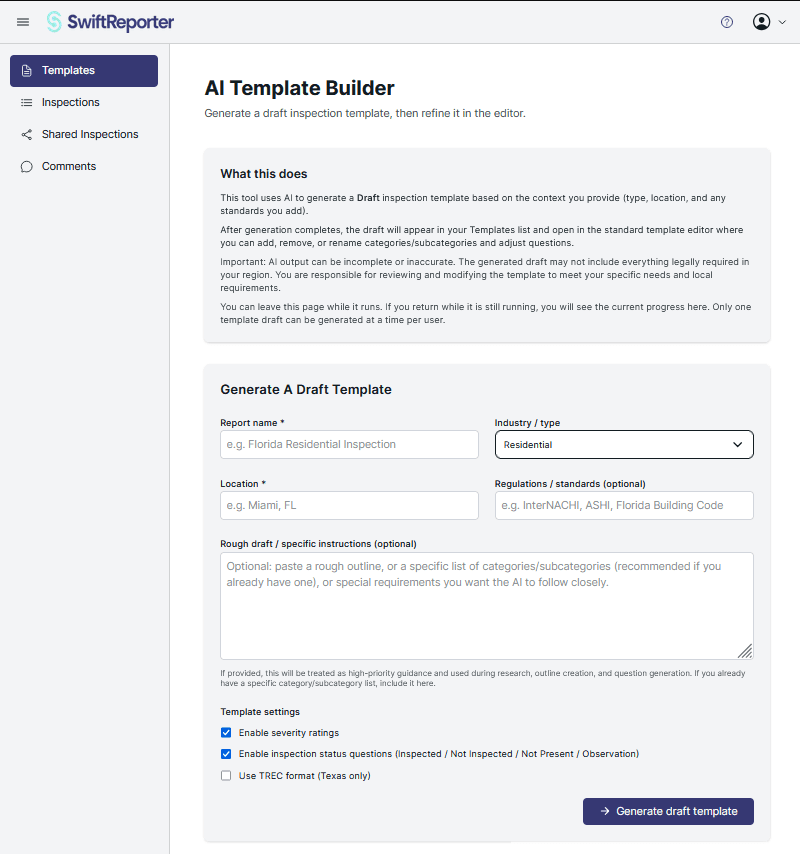
The Template wizard is a great way to start a template from scratch. Our AI will take the information you provide it, and search the web for supporting documentation, example reports, and required regional rules as needed, then build that into a template in SwiftReporter. For the best results, tell it exactly what you want.

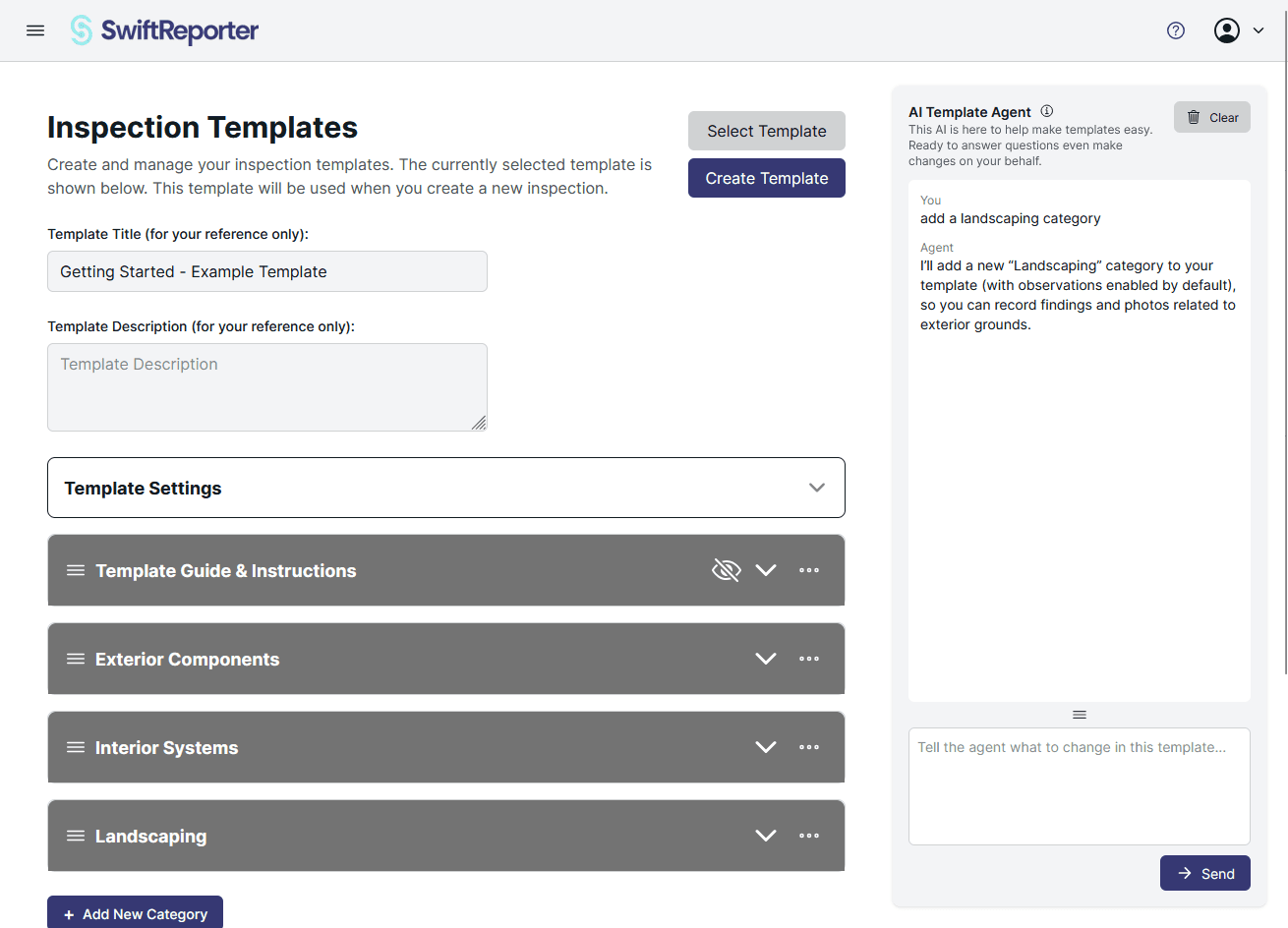
The Template Agent is a new sidebar in the template edit screen. You can ask this agent anything about templates, and it can make any change to a template that you can. You can ask it to do anything from writing questions and answers, to changing formatting and ordering. You review the changes it suggests before they are saved, so you stay in control.

0.7.1

Custom Covers and Template Workflows

October 25, 2025

Customizable Report Covers

Version 0.7.1 gives you more control over how your reports look and feel before they reach your clients.

Key Features

  • Custom cover page layouts – Configure cover content to better match your branding and the way you present your inspections.
  • Cleaner observations formatting – Prettier observation layouts make long reports easier to skim and understand.
  • TREC format support – Generate reports that follow the TREC structure and expectations for Texas inspectors.

Smarter Template Management

  • Duplicate template categories and subcategories – Reuse existing structures instead of rebuilding them from scratch.
  • Drag-to-reorder – Quickly reorganize categories and subcategories to match how you think about your inspection workflow.

Better Storytelling with Photos

  • Photo captions in observations – Add context directly under each image so clients understand what they are seeing and why it matters.

This release focuses on presentation and workflow, helping you ship polished, on-brand reports with less effort.

0.7.0

Quick Add and Smarter Comment Search

October 18, 2025

Faster Reporting with Quick Add

Version 0.7.0 focuses on speeding up everyday report writing by making your most-used content instantly accessible.

Key Features

  • Quick-add comments and notes – Pin frequently used content so you can drop it into observations with a single click.
  • Context-aware suggestions – See smart recommendations based on the current category and subcategory you are editing.
  • Usage insights – Visual usage statistics show how often each comment or note is used, helping you refine your library over time.

Refined Editing Experience

  • New subcategory content architecture – A more modular component structure keeps complex reports organized and easier to maintain.
  • Improved dropdown components – Custom triggers and better interactions make navigation smoother throughout the editor.

Smarter Comment Search

  • Template-prioritized results – Search now prioritizes comments from your active templates so the most relevant content appears first.
  • Optimized performance – Searches are limited to your most-used comments to keep results fast and focused.
  • Enhanced search modal – Better filtering, pagination, and layout make it easier to find the exact comment you need.

This release is all about speed and clarity, helping you move through complex inspections with fewer clicks and more confidence.

0.6.0

0.6.0 - Web Report Sharing

October 13, 2025

Version 0.6.0 introduces collaborative reporting with secure web-based sharing capabilities. This update transforms how inspection professionals share their work with clients and stakeholders.

Key Features:Web Report Sharing - Send email invitations to share inspection reports securely with clients and team members.

Shared Inspections View - Recipients get a dedicated read-only view with full access to report details and media.

Enhanced PDF Performance - Significantly faster PDF download speeds for quicker report delivery.

Improved Media Security - Robust session cookie authentication ensures images and media display correctly in shared inspections across all environments.

Seamless Authentication - Automatic session management keeps users authenticated without interruption.

This release focuses on making collaboration effortless while maintaining the security and performance inspection professionals demand. Share reports with confidence and deliver results faster than ever before.

0.5.0

Google Drive Bulk Upload Integration

August 1, 2025
Google Drive Bulk Upload Integration

Version 0.5.0 brings a major productivity enhancement with Google Drive bulk upload functionality for inspections. This update streamlines the process of importing multiple files and data into your inspection workflow.

Key Features:
  • Google Drive Bulk Upload - Import multiple files and data directly from Google Drive into your inspections
  • Progress Tracking - Real-time updates and progress indicators during bulk upload operations
  • AI Generation Indicators - Visual indicators showing AI-generated content vs. saved comments in observations
  • Template Synchronization - Improved comparison and synchronization between inspection templates and source templates
  • Enhanced Auto-save - Better observation editing with smarter auto-save functionality that only saves when changes are detected

This web application update focuses on improving efficiency for inspection professionals who need to process large amounts of data quickly and accurately.

0.4.2

Recommendation Mapping and UI Improvements

July 25, 2025
New Recommendation Mapping System

We've completely revamped the Spectora template import process to make it more user-friendly and powerful. The new multi-step import workflow now includes:

  • Recommendation Mapping: Automatically detect and map recommendation placeholders in your Spectora templates
  • Pre-filled Suggestions: Smart defaults for common professional types like electricians, plumbers, HVAC technicians, and more
  • Guided Setup: Step-by-step process to ensure all recommendations are properly configured before import

This enhancement makes importing Spectora templates much more efficient and ensures that all your recommendations are properly formatted and ready to use in your inspections.

Enhanced Security and UI Improvements

We've also made several important improvements to the user interface:

  • Password Icon Visibility: Fixed password reveal icons to maintain consistent color across all themes
  • Severity Management: Improved severity value mapping in reports and observations for better organization
  • Template Information: Inspection lists now display template information for better context

These changes provide a more polished and professional experience while maintaining the reliability you expect from Swift Reporter.

0.4.0

Customizable Reports & Enhanced Security

July 13, 2025

Report Customization

You can now disable the cover page and table of contents in your reports, giving you more control over the final document structure.

Enhanced Security

• Support for additional special characters in passwords

• Improved authentication security measures

User Experience Improvements

• Simplified signup process with reduced required information

• Minor styling improvements across the application

0.3.9

Comments & Notes Integration

July 6, 2025

Comments and Notes Integration

Your inspection reports now include comprehensive comments and notes, making it easier to provide detailed explanations and context for your findings.

Template Enhancements

• New dropdown question type for more flexible template creation

• Enhanced help messaging for comment additions

System Improvements

• Removed problematic API routes that were causing compatibility issues

• Improved overall system stability

0.3.8

Help System & Observation Summaries

June 29, 2025

Help Modal System

We've introduced a comprehensive help system to guide you through every feature, making Swift Reporter easier to use than ever.

Enhanced Reports

• New observation and summary sections provide better report structure

• Enhanced explanations throughout the interface

Mobile Improvements

• Restored mobile download functionality for seamless report access on any device

0.3.7

Camera Functionality & Photo Improvements

June 22, 2025

Camera Functionality

You can now capture photos directly within the web application, eliminating the need to upload photos from other sources.

Template Editor Improvements

• Better user experience with enhanced editing tools

• Improved workflow for template creation and modification

Photo Handling

• Enhanced cross-platform photo compatibility

• Improved photo processing and optimization

0.3.6

Light Theme & Color Customization

June 15, 2025

Light Theme Support

Swift Reporter now offers a beautiful light theme option, giving you the flexibility to choose the interface that works best for your environment.

Color Customization

• Full color customization capabilities

• Dynamic theme switching between light and dark modes

Bug Fixes

• Resolved pre-rendering issues

• Fixed various linter errors for improved code quality

0.3.5

Report Completion & PDF Templates

June 8, 2025

Report Completion Workflow

We've streamlined the entire report completion process, making it easier to finalize and deliver professional inspection reports.

PDF Download

• Generate and download professional PDF reports

• Optimized formatting for print and digital distribution

Template Library

• Pre-built template library for quick setup

• Redesigned template creation interface for better usability

0.3.4

AI Features & Photo Annotation

June 1, 2025

AI-Powered Features

• Automatic audio transcription for voice notes

• AI-powered observation summarization to create professional descriptions

Photo Annotation System

Add drawings, annotations, and callouts directly to your photos with our comprehensive annotation tools, making it easier to highlight issues and provide clear explanations.

Enhanced Template Editor

• Drag-and-drop functionality for easier template creation

• Improved user interface for better workflow management

0.3.3

Inspection Forms & Photo Viewer

May 25, 2025

Detailed Inspection Forms

New dynamic country and state input fields make it easy to create location-specific inspection reports with accurate geographic information.

Improved Photo Viewer

• Enhanced user experience with better navigation

• Optimized photo display and interaction

Template Management

• Comprehensive template management system

• Refined photo annotation system for better precision

0.3.2

Web Platform & Template Editor

May 18, 2025

Full Web Platform

Swift Reporter is now fully functional on the web, bringing all inspection capabilities to your browser with the same powerful features you love.

Template Editor with PDF Upload

• Upload PDF templates and convert them to editable formats

• Enhanced template creation workflow

Responsive Design

• Improved responsive design for all screen sizes

• Better mobile and tablet experience

0.3.1

Account Management & Dashboard

May 11, 2025

Integrated Account Management

All account management features are now integrated into the main application, providing a seamless user experience without external redirects.

User Dashboard

• Dynamic user data display

• Recent activity dashboard for workflow tracking

• User menu with easy access to all account features

Navigation Improvements

• Enhanced navigation consistency

• Improved user interface design

0.3.0

Core Inspection Functionality

May 4, 2025

Core Inspection Features

This major release brings the core inspection functionality that makes Swift Reporter powerful and easy to use for professional inspectors.

Template System

• Basic template system for customizing your reports

• Foundation for advanced template features

User Authentication

• Secure user authentication and account management

• Firebase deployment configuration

• Testing framework setup for reliable development

0.2.0

Development Infrastructure

April 27, 2025

Development Environment

Established a robust development environment with all necessary tools and configurations for efficient development and testing.

Project Structure

• Clean, scalable project architecture

• Organized file structure for maintainability

Deployment Pipeline

• Automated build and deployment processes

• Quality assurance and testing integration

0.1.0

Initial Release

April 20, 2025

Welcome to Swift Reporter

We're excited to introduce Swift Reporter, the comprehensive inspection reporting platform designed to help professionals create detailed, professional reports with ease.

Initial Features

• Basic application framework

• Development tooling configuration

• Foundation for future enhancements

Getting Started

This initial release sets the groundwork for all the powerful features to come. Stay tuned for exciting updates!